Android View Rendering
We have following sequence for rendering
requestLayout()
      ↓measure pass
      ↓layout pass
      ↓draw pass
which can seen as
ViewRootImpl.performTraversals()
    ↓performMeasure()
    ↓performLayout()
    ↓performDraw()
Where it can be related to
Measure = How big am I?
Layout = Where am I?
Draw = What do I look like?
requestLayout
As per documentation
Call this when something has changed which has invalidated the layout of this view. This will schedule a layout pass of the view tree. This should not be called while the view hierarchy is currently in a layout pass (isInLayout(). If layout is happening, the request may be honored at the end of the current layout pass (and then layout will run again) or after the current frame is drawn and the next layout occurs. Subclasses which override this method should call the superclass method to handle ==possible request-during-layout errors== correctly.
RequestLayout is called when
view.layoutParams.width = 500textView.text = "Very long text"imageView.setImageBitmap(...)
What it communicates is that my size or position may have changed, please re-measure and re-layout me. So android schedules measure, layout, draw again
invalidate
We call this when we want the view to be redrawn, why we want view to be redrawn? It could be because of
- Animation that we are doing, 60 fps
- We have updated the field which determines the color, and hence canvas need to redraw it with updated color
From docs
Invalidate the whole view. If the view is visible, onDraw(Canvas) will be called at some point in the future. This must be called from a UI thread. To call from a non-UI thread, call postInvalidate().
==When we call inValidate function, Android OS checks what has changed, size? position? pixel?== and hence call apt functions to update view
==In case of==
- circular progress bar
- when progress changes
- only onDraw is called because only colored pixel has changed
- no size change,
- no position change
- when progress changes
onLayout
decides where children go
When phone switches from portrait to landscape, or from landscape to portrait then onLayout is called.
When in linear layout, lets say 1st child is textView and its size increased then parent calls onLayout to re-compute child placement
So when size changes, or position changes call requestLayout. But if only appearance changes call only
inValidate
param changed: Boolean,
it tells Did my bounds change since last layout?
| requestLayout() | onLayout() |
|---|---|
| A request for a new layout pass | The actual layout callback |
| Can be called by any View | Called by Android framework |
| Schedules measure + layout + draw | Places children inside a ViewGroup |
| Happens before layout | Happens during layout |
| User/framework initiated | Framework initiated |
requestLayout()
    = "Please perform layout again."
onLayout()
    = "I'm currently performing the layout."```

# onMeasure

```kotlin
override fun onMeasure(
    widthMeasureSpec: Int,    heightMeasureSpec: Int) {}
it is essentially asking:
Parent → ChildHow big do you want to be,given these constraints?The parent passes those constraints through MeasureSpec.
val widthMode = MeasureSpec.getMode(widthMeasureSpec)
val widthSize = MeasureSpec.getSize(widthMeasureSpec)
Mode
- EXACTLY
- Must see the size then
android:layout_width="200dp"
- AT_MOST
- u can be any size, at max upto this
wrap_contentscroll_container
- UNSPECIFIED
- Take whatever size you want.
- used by
- scroll view
- recycler view
- custom viewgroup
Android Compose Rendering
Compose has 3 independent phases
1. Composition (build UI tree)
2. Layout
   ├─ Measure   └─ Place3. Draw
Unlike view system, compose can invalidate these phases independently.
Logging the various phases
In correct way
fun Modifier.debugRendering(
    tag: String): Modifier {

    return this        .layout { measurable, constraints ->
            Log.d(tag, "Measure")
            val placeable =                measurable.measure(constraints)
            layout(                placeable.width,                placeable.height            ) {
                Log.d(tag, "Layout")
                placeable.place(0, 0)            }        }        .drawWithContent {
            Log.d(tag, "Draw")
            drawContent()        }}

Canvas(
    modifier = Modifier        .size(200.dp)        .debugRendering(            "CircularProgressCompose"        )) { .... }
Why this will give wrong logs:
The implementation has two chained modifier nodes:
- layout {} (outer node) — intercepts measure/layout
- drawWithContent {} (inner node, closer to Canvas) — intercepts draw
Because they live at different positions in the modifier chain, they don’t atomically represent the same composable’s render pass. In a draw-only invalidation, Compose walks the chain and the draw phase passes through the outer layout node (it’s transparent to draw) and hits drawWithContent separately. The result: they log from different “perspectives” of the chain, not the same one.
The correct way
// Two chained modifiers (.layout{} then .drawWithContent{}) are TWO separate nodes at different
// positions in the modifier chain. Measure/Layout are intercepted outer, Draw is intercepted inner —
// they don't track the same composable's render pass atomically.
//
// Fix: a single Modifier.Node implementing both LayoutModifierNode + DrawModifierNode so all
// three phases are intercepted at the exact same position in the chain.

fun Modifier.debugRendering(tag: String): Modifier = this.then(DebugRenderingElement(tag))

private data class DebugRenderingElement(val tag: String) : ModifierNodeElement<DebugRenderingNode>() {
    override fun create() = DebugRenderingNode(tag)    override fun update(node: DebugRenderingNode) {        node.tag = tag    }}

private class DebugRenderingNode(var tag: String) :
    LayoutModifierNode, DrawModifierNode, Modifier.Node() {
    override fun MeasureScope.measure(        measurable: Measurable,        constraints: Constraints    ): MeasureResult {        Log.d(tag, "Measure")        val placeable = measurable.measure(constraints)        return layout(placeable.width, placeable.height) {            Log.d(tag, "Layout")            placeable.place(0, 0)        }    }
    override fun ContentDrawScope.draw() {        Log.d(tag, "Draw")        drawContent()    }}
Why the fix is correct:
DebugRenderingNode implements both LayoutModifierNode and DrawModifierNode as a single node at one position in the chain. All three phases (Measure → Layout → Draw) are now
intercepted at the exact same chain position, giving accurate, consistent logs that correctly reflect when Compose skips measure/layout (draw-only updates) vs. runs the full pipeline.
UI Examples
In upcoming sections we would be creating same animations and views in both XML-views and compose.
CircularProgressBar
See code for CircularProgressBar implementation in repo here, read comments on overriden render functions
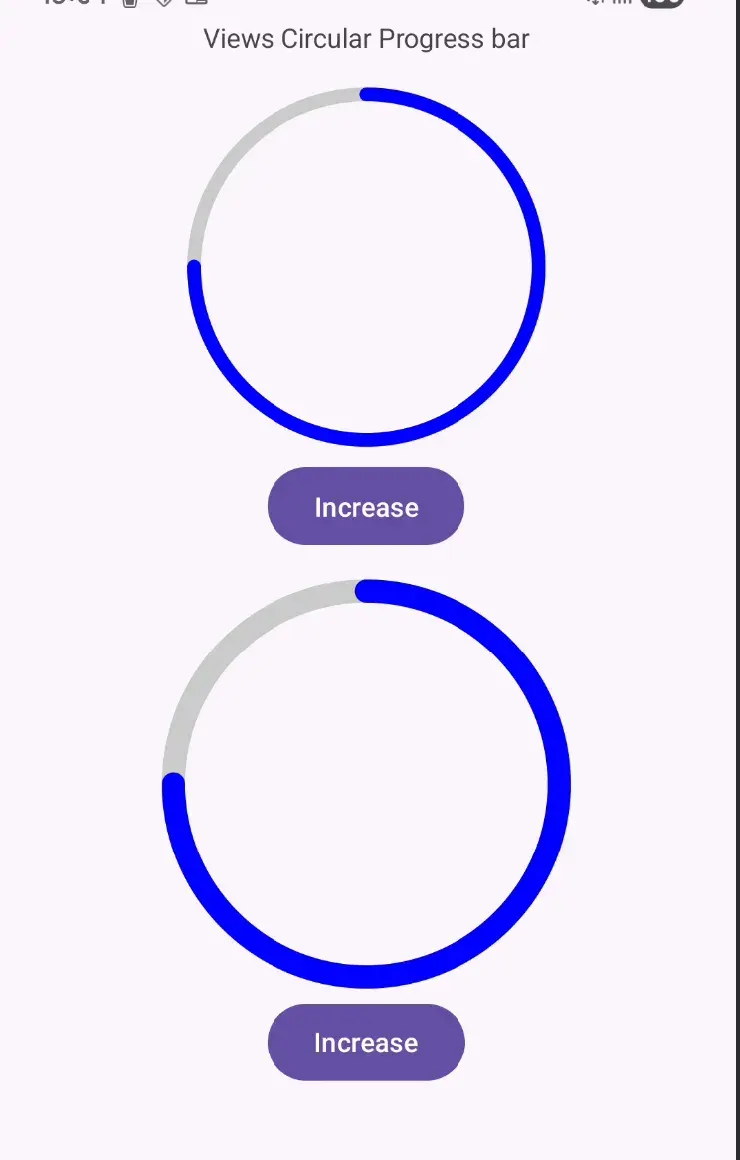
XML views
On progress change, inValidate was called , and only onDraw was called again because no size change and no layout arrangement was changed and hence android view framework never called them.
Compose
on progress change, recomposition happened again, and only draw phases happened again.
Here XML and compose is same. Simple example
Are both equivalently smarter?
The circular progress bar case is a flat, fixed-size, single-view scenario. Both frameworks are equally smart there because there’s no layout complexity to expose the difference.
Compose wins in three specific scenarios:
1. Multiple measure passes in nested layouts
In XML, many ViewGroup types call onMeasure twice — once with AT_MOST to probe size, then again with EXACTLY once the parent knows its own size. Nesting amplifies this exponentially:
LinearLayout (wraps)
└── RelativeLayout (wraps) → 2 passes at this level
└── LinearLayout (wraps) → ==2×2 = 4 passes at this level==
└── your View → ==2×2×2 = 8 measure calls==
Compose guarantees single-pass measurement at every level — no exceptions. The FlowChipLayout you just built with Compose’s Layout {} will always measure each chip exactly once regardless of nesting depth.
2. requestLayout() propagates up to root
==This is the biggest difference and your chip layout example actually demonstrates it perfectly:==
XML path when you toggle maxChipsPerRow:
FlowChipLayout.requestLayout()
→ invalidates FlowChipLayout
→ invalidates LinearLayout parent
→ invalidates ScrollView
→ invalidates the Fragment’s root
→ all the way up to DecorView (window root)
→ entire tree re-measures from the top down
Compose path when maxChipsPerRow state changes:
Only FlowChipLayout recomposes
→ measures its own children (chips)
→ reports new height to its direct parent (Column item)
→ only the Column’s slot for this item re-layouts
→ scroll container adjusts scroll bounds only
The XML system can’t know which parts of the tree are unaffected by the child’s change, so it must re-examine everything from the root. Compose tracks the dependency graph — it knows exactly which parent cares about FlowChipLayout’s new size.
3. Scoped recomposition vs. full subtree invalidation
==In XML: if a parent calls invalidate(), every child redraws. If a parent calls requestLayout(), every child re-measures.==
In Compose: state change recomposes only the composables that read that state. Siblings are untouched.
// Only the Text that reads `count` recomposes —
// the other Text and Button are completely skipped
var count by remember { mutableStateOf(0) }
Column {
Text("Static label") // ← never recomposes when count changes Text("Count: $count") // ← recomposes only this Button(onClick = { count++ }) { Text("Tap") }}The equivalent XML has no mechanism to skip sibling redraws when one child’s data changes — notifyDataSetChanged() or requestLayout() blasts everything.
Flowable Chips
See code here, put logs
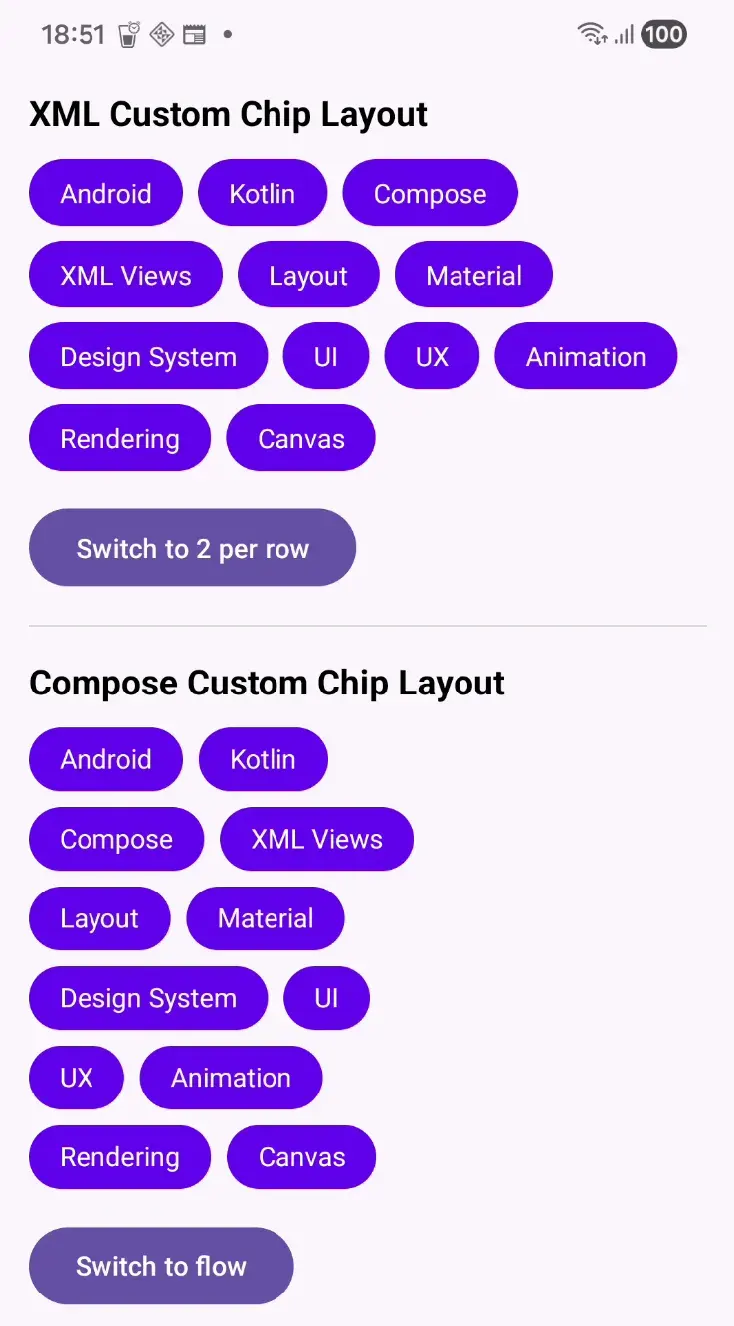
XML views Implementation
Few observations, and reasoning for it
- requestLayout() is called 14 times times why??
- each child addition as
addView()triggers requestLayout as it can increase the parent size
- each child addition as
- in onMeasure, what significance does measureChild() have??
- Without it, you’d have to manually calculate what MeasureSpec to give the child based on the child’s LayoutParams. measureChild() does that translation for you:
- Parent has: EXACTLY 1080px width, UNSPECIFIED height
- Child LayoutParams: WRAP_CONTENT width, WRAP_CONTENT height
- measureChild() translates this to:
- child width spec → AT_MOST 1080px (because WRAP_CONTENT = “take up to this”)
- child height spec → UNSPECIFIED (no vertical constraint)
- then calls child.measure(childWidthSpec, childHeightSpec)
- Without calling measureChild(), child.measuredWidth and child.measuredHeight would be 0 — the chip TextViews would have no size, and your flow layout calculation would be completely wrong.
- why onMeasure is called twice, and same total height was calculated, why??
- is it because of scrollView??
- yes happening because of scroll view
- we have
ScrollView -> Linear Layout -> FlowableChipsContainer - but why??
android:fillViewport="true"is the reason for 1 more extra pass
- is it because of scrollView??
- then invalidate was called
- who called it??
- Android OS
- who called it??
- then onMeasure was called 1 more time, same calculations
- then onLayoutChanged,
- then onMeasure, same height calculation
- then onLayoutChanged
- when I switched the layout configs
- requestLayout once
- onMeasure twice
- onMeasure called twice because of scrollView
- that’s LinearLayout’s standard two-pass behavior inside a ScrollView
- Every time FlowChipLayout’s height changes, the entire LinearLayout and ScrollView also re-measure.
- onLayoutChange once
Compose Implementation
On toggle of max col change we get
Recomposition maxChipsPerRow=2
Measure
Layout
Draw
Why all 3 phases are unavoidable here
When maxChipsPerRow toggles, two things fundamentally change:
- Chip positions change — each chip moves to a different x,y coordinate
- Total height changes — fewer rows → smaller height, more rows → taller height
Because the size of FlowChipLayout itself changes, Compose cannot skip any phase:
maxChipsPerRow state changes
→ recomposition new value flows into Layout {}
→ Measure new totalHeight calculated (different from before)
→ Layout/placement each chip placed at new coordinates
→ Draw new positions must be painted
Compose can only skip phases when the reported size stays the same. Since height changes here, the parent composable (Column) must also be informed of the new size — which means all three phases run.
Shared displayList? 🤔
There is a StaticDebugLabel its’ draw phase also get executed on column config change, which tells that its a shared displayList.
By default, composables do not have their own isolated draw layer. They share the parent’s draw layer — in this case, the Column’s display list.
When FlowChipLayout changes size and redraws, Compose must reconstruct the parent layer’s display list. Every draw instruction in that display list re-executes — including StaticDebugLabel's draw — even though its pixels haven’t changed.
Think of the display list as a single recorded script for the whole layer:
[draw StaticDebugLabel text]
[draw FlowChipLayout chips] ← changed
[draw Button]
When anything in the script changes, Compose re-records the entire script. StaticDebugLabel’s draw instruction re-runs as part of that.
How to truly isolate draw
Wrapping StaticDebugLabel in Modifier.graphicsLayer {} gives it its own hardware-backed texture. Compose can then composite that cached texture without re-executing its draw
commands. Draw would be genuinely skipped.
Without graphicsLayer, the composable’s draw is only skipped when nothing in its entire shared layer changed — which never happens when a sibling is actively toggling layout.
The important take-away
Compose’s “smart” optimisation is primarily about avoiding recomposition (re-running Kotlin code) and remeasure. Drawing at the display list level is still layer-scoped, not
per-composable. This is why graphicsLayer exists — it’s the explicit opt-in for truly isolated draw caching.
Audio Visualiser
See code here for it
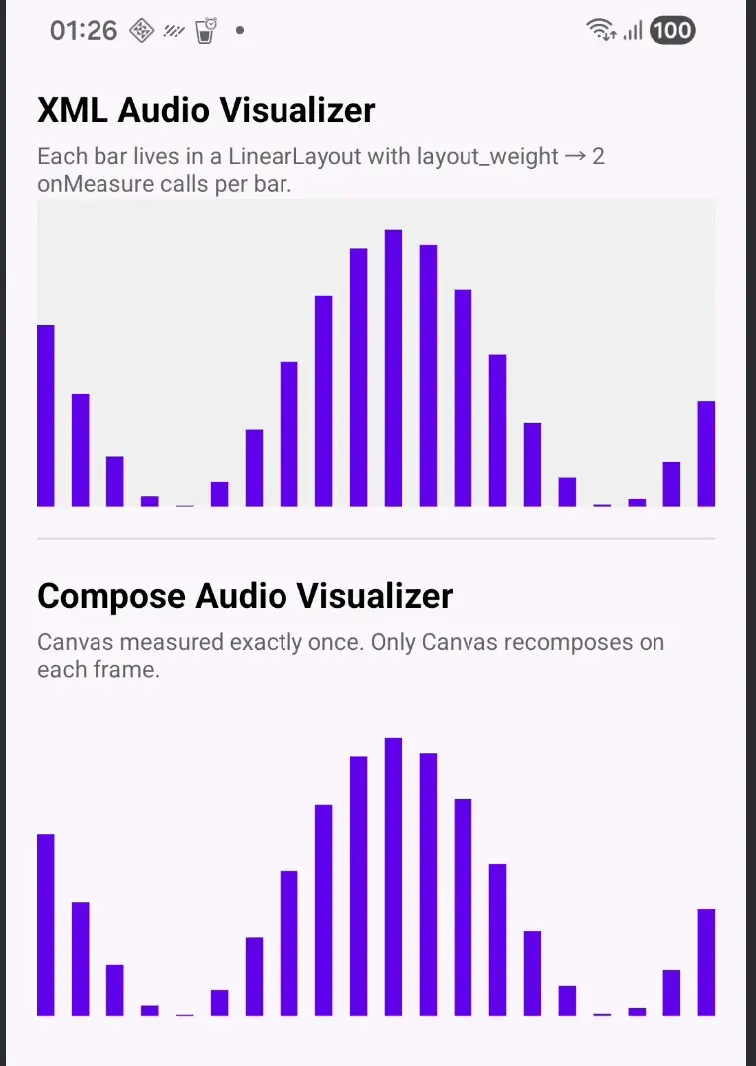
Views implementation
we have in XML as following
ScrollView -> AudioVisualizerView
We get 2 onMeasure classes with following logs
onMeasure modeW=EXACTLY modeH=EXACTLY
onMeasure modeW=EXACTLY modeH=EXACTLY
Certainly its a view 2 layout pass thing
doTraversal()
    └── performTraversals()
          ├── measureHierarchy()          ← negotiate window size
          │     └── performMeasure()      ← your onMeasure #1
          │
          ├── [WindowManager confirms size]
          │
          └── performMeasure()            ← your onMeasure #2 (final)
                └── performLayout()
                      └── performDraw()
This is Android’s irreducible baseline. It lives in ViewRootImpl — above every ViewGroup, above ContentFrameLayout, above everything you can touch. You cannot eliminate these 2 calls. Every View in every Android app gets onMeasure called at least twice on startup because of this two-step window negotiation.
Compose receives the same two ViewRootImpl passes via ComposeView::onMeasure, but absorbs them without re-running your Layout {} blocks — because Compose tracks whether inputs to each node actually changed between passes.
Double Taxation problem
| ViewGroup | Why | Passes |
|---|---|---|
| RelativeLayout | Separate horizontal + vertical constraint solving passes | ×2 |
LinearLayout with layout_weight | Pre-weight UNSPECIFIED pass + allocation EXACTLY pass | ×2 |
FrameLayout with wrap_content | Second pass for match_parent children once own size is known | ×2 |
| ConstraintLayout with chains | WRAP_CONTENT chains + spread/spread_inside triggers second pass to distribute remaining space | ×2 |
Compose implementation
Recomposition
Measure
Layout
Draw